Ollama 0.23 adds Claude Desktop to its ollama launch ecosystem. Claude Cowork and Claude Code are now both supported within the Claude Desktop app. That means the same open models you've been running through Ollama's cloud can now power your Claude Desktop sessions, without touching a config file or exporting environment variables.
ollama launch is a command that sets up and runs coding tools like Claude Code with local or cloud models. No environment variables or config files needed. The Claude Desktop integration follows that same pattern and extends it to the GUI app most people actually use day to day.
For developers who've been watching Anthropic's API costs pile up, this is a practical alternative worth knowing about.
What Changed in Ollama 0.23
The ollama launch command now lets you use Ollama's models with Claude Code, Codex, OpenCode, Droid, and Clawdbot without separate configuration. Version 0.23 extends that list to include Claude Desktop specifically, making it the first release where the graphical Claude app becomes a first-class target.
Ollama recently made it possible to run models not only locally, but also in the cloud. By default, all models tagged with cloud are run this way. Cloud models are automatically offloaded to Ollama's cloud service while offering the same capabilities as local models. This is most useful for larger models that wouldn't fit on a personal computer.
The net effect: your laptop becomes the control surface. The heavy inference work runs remotely through Ollama's infrastructure.
How to Get Started
Download Ollama 0.23, then run:
ollama launch claude-desktop
You'll be prompted to create an Ollama API key. Once that's done, Claude Desktop will automatically discover all available Ollama Cloud models. No manual environment variable wiring. No proxy layers.
To restore the default Claude profile and go back to Anthropic's models:
ollama launch claude-desktop --restore
You don't need to manually insert an Ollama API key into a wrapper to use cloud models from supported launched apps. Ollama authenticates cloud-backed requests through your local signed-in install.
Choosing the Right Model
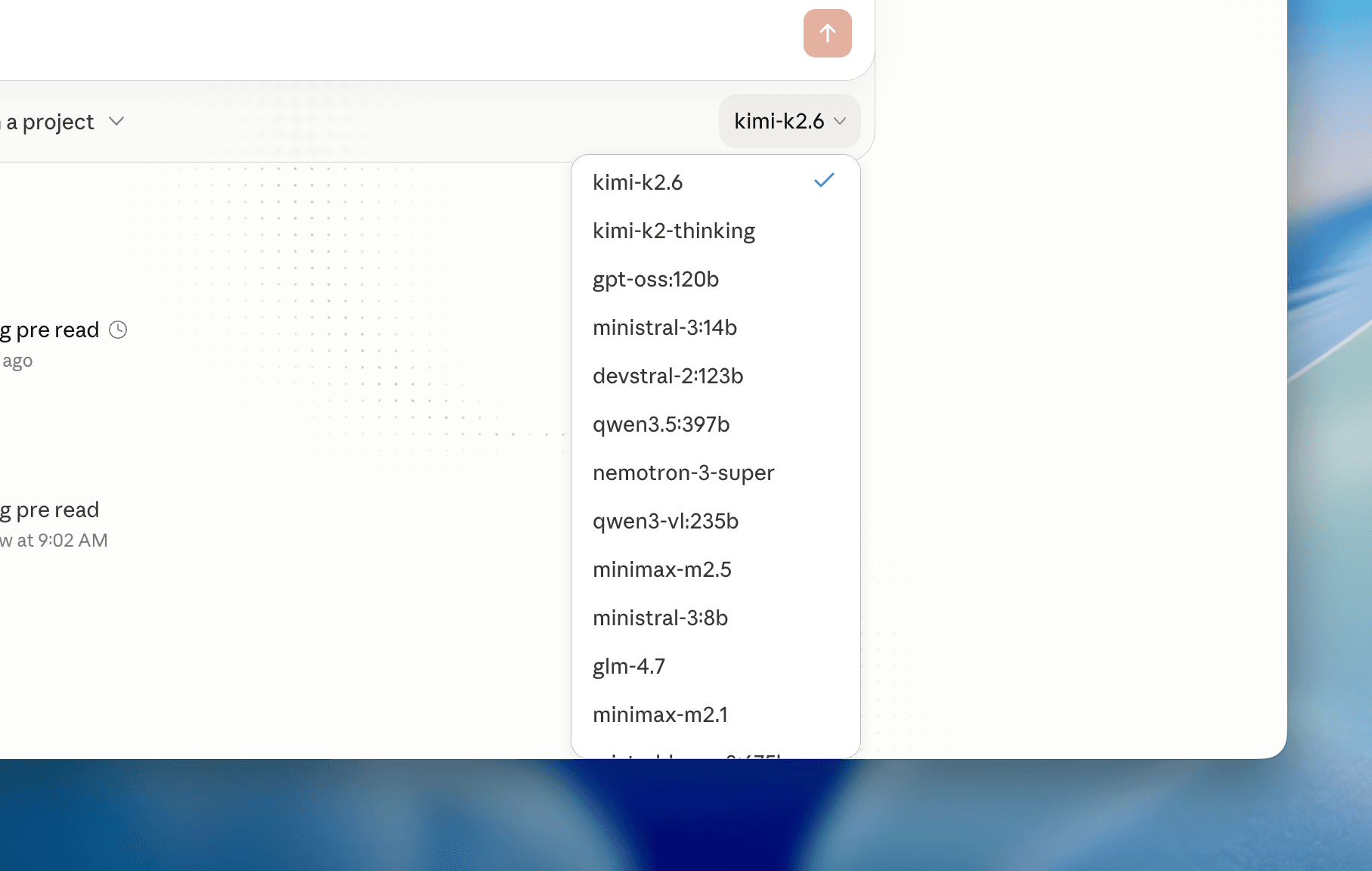
Once set up, Ollama Cloud models appear automatically in Claude Desktop's model selector. The right choice depends on what you're doing.
For demanding coding and co-working tasks, the recommended models are:
- kimi-k2.6 — an open-source, native multimodal agentic model built for long-horizon coding, coding-driven design, proactive autonomous execution, and swarm-based task orchestration.
- qwen3.5 — a family of open-source multimodal models that delivers exceptional utility and performance.
- minimax-m2.7 — MiniMax's M2-series model for coding, agentic workflows, and professional productivity.
- glm-5.1 — the next-generation flagship model for agentic engineering, with significantly stronger coding capabilities than its predecessor. It achieves state-of-the-art performance on SWE-Bench Pro and leads GLM-5 by a wide margin.
For users without a paid Ollama Cloud subscription, models with strong tool calling and agentic behavior are the better pick:
- nemotron-3-super — NVIDIA Nemotron 3 Super is a 120B open MoE model activating just 12B parameters to deliver maximum compute efficiency and accuracy for complex multi-agent applications.
- gemma4:31b — Gemma 4 has clean multimodal support and handles screenshots, diagrams, and photos well.
Claude Code connects to Ollama using the Anthropic-compatible API. Note that Claude Code requires a large context window — at least 64k tokens is recommended. Keep that in mind when selecting a model, since smaller or older models may not meet that threshold reliably.
Why Tool Calling Matters for Agentic Use
Not all models behave the same inside an agentic environment like Claude Code. When using local models like qwen3.5, Claude Code can behave like a plain LLM with no file read/write or tool usage. But when switching to a cloud model like qwen3.5:cloud, it works properly and is able to create files using Claude Code.
This is the key distinction between casual chat use and real agentic coding sessions. The model can still act locally through Claude's tool layer while the model itself runs remotely. Your codebase stays on your machine. The model processes instructions in the cloud and sends back structured actions.
Cloud inference also keeps your laptop cooler and lighter: less RAM pressure, less overheating, and no need for a GPU-heavy machine when using cloud-hosted models. That's a real benefit for anyone running this on a MacBook Air or a mid-range dev machine.
What This Means for Claude Desktop Users
Before this release, getting non-Anthropic models into Claude Desktop required manual environment variable configuration or proxy setups. Claude Desktop has a third-party inference feature that lets you replace Anthropic's API with any model provider, including a local AI model running entirely on your machine. Ollama 0.23 now wires into that feature natively for cloud models.
You no longer need a custom wrapper just to use Ollama cloud models inside your dev tools. Ollama now supports launching supported apps directly, including Claude Code, Codex, OpenCode, and OpenClaw.
For teams that care about cost control, this integration opens up a meaningful alternative. Third-party alternatives can save up to 98% compared to Opus 4.5, while local options like Ollama are completely free.
Frequently Asked Questions
6 questions
1What is `ollama launch claude-desktop`?
It's a command introduced in Ollama 0.23 that configures Claude Desktop to use Ollama's cloud models instead of Anthropic's default inference, automatically handling authentication and model discovery.
2Do I need a paid Ollama Cloud subscription to use this?
No. Free-tier users can still use models like nemotron-3-super and gemma4:31b. A paid subscription unlocks the more capable options like kimi-k2.6, qwen3.5, and glm-5.1.
3Will Claude Desktop still work with Anthropic's models after this setup?
Yes. Run ollama launch claude-desktop --restore to revert to the default Claude profile and Anthropic's inference.
4Why do some models work better for agentic coding than others?
Tool calling support is the deciding factor. Models that don't properly implement tool calling will behave like plain chat models inside Claude Code, with no ability to read or write files.
5Does my code leave my machine when using Ollama Cloud models?
Your local files are accessed through Claude's tool layer on your machine. The model inference happens remotely on Ollama's cloud infrastructure, so prompts and context are sent over the network.
6Final Thoughts
The claude-desktop target in Ollama 0.23 is a small addition on paper, but it closes a real friction point. Previously, getting Ollama's cloud models into Claude Desktop meant either manual config work or a proxy layer. Now it's one command and an API key prompt.
What I'd watch going forward is how well the recommended models hold up on multi-step agentic tasks inside Claude Cowork specifically. GLM-5.1's SWE-Bench Pro results are promising, and Kimi K2.6's focus on long-horizon execution makes it an interesting pick for complex refactoring sessions. The context window requirement of at least 64k tokens is a real constraint that filters out a chunk of the model library, so Ollama's curation of recommended models here is doing useful work.
If you're already using Claude Desktop for coding and haven't explored Ollama's cloud tier, this is a low-friction entry point. Give it a run and see how the model quality compares to what you're used to. Drop your thoughts in the comments.