Google's desktop Gemini client was already behind the web version when it shipped. Based on what's leaking out of internal builds right now, that gap is about to close in a significant way. Ahead of Google I/O 2026, a wave of pre-release signals from inside the desktop Gemini build points to a sweeping upgrade, and the scope of what's coming is larger than a typical feature drop.
Just days before Google I/O kicks off, fresh signals from inside the desktop Gemini build point to a sweeping upgrade for the recently launched Mac client, which has lagged behind the web version. The initial release was deliberately pared back, but the next wave appears ready to close that distance. What the leaks describe isn't a chatbot with extra features. It's a local agent platform.
As someone who covers this space daily, I can say this one actually moves the needle. The combination of local file access, a context-aware cursor layer, and a persistent voice overlay puts Google in direct competition with tools that developers are actively using for coding and programming workflows right now.
What Is Gemini Spark on Desktop?
Gemini Spark appears to be Google's bid to move Gemini from a chatbot you consult to an agent that acts on your behalf around the clock. Leaked onboarding screens describe it as an "everyday AI agent, ready 24/7 to help with your inbox, online tasks, and more," with a dedicated Agent tab inside Gemini, separate from the existing Chat interface.
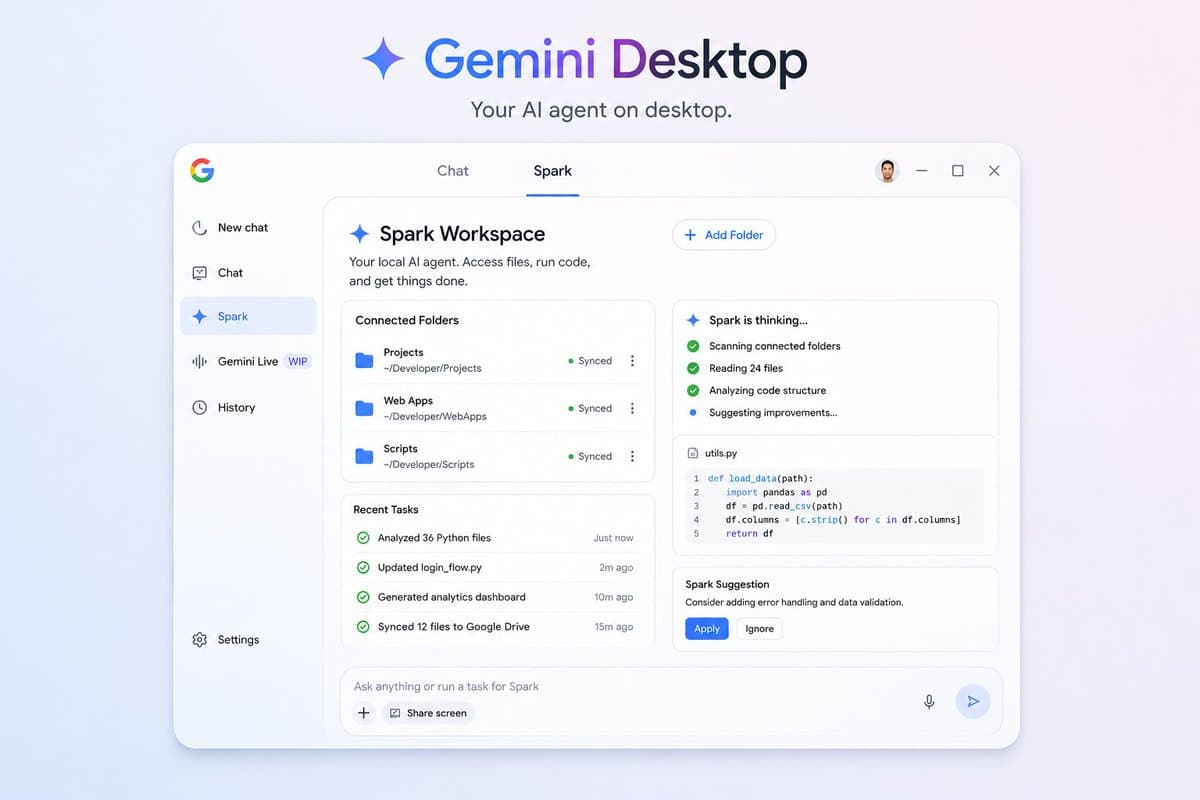
On the desktop side, Spark goes further than inbox management. The most consequential thread is Gemini Spark on desktop. Users would be able to point Spark at local folders and let the agent edit, analyze, move, and rename files within them, with support for skills and connector access to Google Drive and the broader Google services layer.
That would extend Spark from a proactive web assistant to a local file-system agent, the territory currently being pursued by OpenAI's Codex desktop work and Anthropic's Claude Code. For developers, this is the relevant comparison point. Spark on desktop isn't positioned as a productivity tool for email. It's positioned as a coding and file management agent that runs locally.
How the Two-Mode Interface Works
The desktop app is structured around two distinct workspaces:
- Chat mode — the standard conversational interface most users already know
- Spark mode — a dedicated agentic workspace for local task execution
This new feature allows users to have an "Agent" tab inside Gemini. Rather than acting like ordinary chatbots that only answer questions, Spark is able to do tasks such as cleaning up Gmail spam, compiling meeting summaries from various documents, and generating customised news summaries on its own.
From there, users can create recurring "skills," which are automated task templates, and schedule workflows to run without manual oversight. Practical examples shown in leaked screenshots include clearing Gmail clutter, assembling pre-meeting briefings, and generating personalised news digests.
The local Skills system is where this gets technically interesting for programmers. The leak also mentions something called "skills," hinting that Spark could leverage modular templates for tasks or app integrations to grow its capabilities over time. According to Google's own Gemini Skills repo on GitHub, evaluations found that adding the Gemini API skill improved an agent's ability to generate correct API code following best practices to 87% with Gemini 3 Flash and 96% with Gemini 3.1 Pro. Attaching those same skill modules directly into the desktop agent workflow is the logical next step.
Stream to Cursor and the Magic Pointer Layer
One of the more technically distinct features in the leak is Stream to Cursor. Internally framed as Stream to Cursor, this feature appears to plug into the Magic Pointer concept previewed at The Android Show. Rather than waiting for a prompt, the cursor itself would read context around whatever element it hovers over and surface relevant suggestions, blurring the line between pointing device and agent trigger.
This is a meaningful architectural shift. Most AI overlays require you to copy text, open a sidebar, or invoke a keyboard shortcut. A cursor-native context layer means Gemini understands what you're looking at the moment you're looking at it, without any manual hand-off. For coding workflows, the implication is that Gemini could read a function signature, a compiler error, or a diff view just by cursor proximity.
The floating overlay also supports rapid model switching between Gemini 3 Flash and Gemini 3.1 Pro, letting users trade response speed for output quality depending on the task at hand.
Gemini Live as a Persistent Voice Overlay
A Gemini Live mode is being prepared as a floating desktop overlay, allowing Gemini to observe what's happening on screen and respond in real time via a voice model. This positions Google directly against ChatGPT's macOS companion mode and the screen-aware Claude experiments out of Anthropic.
The overlay can share screen, window, or camera context on demand. Gemini Live on desktop still appears to be a work in progress internally, but its presence in the build confirms Google intends the desktop app to host its full agentic stack rather than serve as a thin wrapper around a chat window.
Veo4 Omni Integration Inside the Desktop Client
Video generation is also being threaded into the desktop client through what is internally labeled "Veo4 Omni." The naming hints at a single omni-modal output system rolling up under the broader Gemini Omni umbrella.
Google may be preparing a major AI upgrade ahead of Google I/O 2026, and Gemini Omni is described as far more than a simple Veo 3.1 update. The newly discovered production UI references suggest Google is building a unified multimodal AI system that merges text, image, video generation, and conversational editing into a single workflow.
Threading Veo4 Omni directly into the desktop client means video generation, code analysis, file management, and voice interaction could all run from a single persistent app. That's a different product category than what Gemini desktop launched as.
Key Technical Highlights
- Users can point Spark at local folders and let the agent edit, analyze, move, and rename files within them, with support for skills and connector access to Google Drive.
- Stream to Cursor reads app and window context via cursor position, surfacing suggestions without manual prompts
- Spark draws from a wide data pool: connected apps, browsing sessions, chat history, scheduled tasks, location data, and something Google calls "Personal Intelligence."
- The leaked onboarding text states Gemini Spark "may do things like share your info or make purchases without asking." That's an explicit design choice, not a bug.
- Gemini in Chrome on desktops is getting a Skills feature that lets you quickly run frequently used prompts. Besides saving time, this capability helps educate users about what Gemini can do when given a webpage. Skills are one-click workflows that you invoke by typing a forward slash (/) in the prompt box.
- Gemini Live voice overlay runs as a persistent floating layer with real-time screen awareness
What This Means for Developers
Spark arrives at a moment when Gemini's traffic share has tripled in twelve months, reaching 26.7% of global generative AI web traffic in April 2026, up from just 7.27% a year earlier. The agent race is where the next phase of that competition plays out, and the desktop is the primary surface for developers and power users.
Perhaps one of the most interesting things about the leak is the ability to create "skills." This would allow users to set up recurring tasks with specific instructions, similar to how competitors like Claude handle project-based work. For example, you could teach Spark how you prefer your weekly reports formatted, and it would gather the necessary data from your Docs and Drive to generate them automatically.
For AI coding and programming workflows specifically, local Skills support means you can attach domain-specific knowledge, custom scripts, and project-level context directly into the agent. That's a pattern the Gemini CLI already supports, and bringing it into a full desktop GUI with file system access and cursor-aware context is a meaningful step up.
The onboarding screen also reportedly warns that Gemini Spark could access sensitive information and may share necessary information with third parties to complete tasks. Anyone working with client data or proprietary codebases should read the full permission model carefully before opting in.
Final Thoughts
The thing that stands out most to me here is the architectural intent. Taken together, Google appears to be preparing the desktop app to host its full agentic stack rather than serving as a thin wrapper around the chat window. That's a real shift in product philosophy, and it puts the Gemini desktop app in direct competition with Cursor, Claude Code, and the broader local-agent tooling that developers have been assembling from separate pieces.
The Veo4 Omni thread is the one I'd watch most carefully. If video generation, multimodal editing, and local file access all run from the same persistent desktop client, the question of which AI tool a developer keeps open all day gets more interesting. The open question is whether Google ships this as a coherent, stable product or stages it in the same fragmented way the initial Mac client landed.
All of this is still pre-announcement. Google I/O 2026 opens today, May 19, and official confirmation could look different from what the leaks describe. But the signal-to-noise ratio on these particular leaks, coming from TestingCatalog and corroborated across multiple independent sources, is high enough to take seriously.
What do you think? Is a cursor-aware, always-on local agent the direction you want your AI tooling to go? Drop your thoughts in the comments.
Frequently Asked Questions
5 questions
1What is Gemini Spark?
Gemini Spark is described as an "everyday AI agent" designed to help users with inbox management, online tasks, connected apps, chats, websites and more. On desktop, it also gains local file system access, letting it edit, analyze, and organize files in connected folders.
2How is Gemini Spark different from Project Mariner?
Where Spark differs from Project Mariner, the Google agent that's been out since May 2025, is the framing. Mariner is a browser agent — you tell it to do something and it opens Chrome and does it. Spark is positioned as always-on. It's not waiting for your prompt. It's already running, watching your accounts, deciding what to do next.
3What is "Veo4 Omni" in the Gemini desktop context?
It is the internal label for a unified video generation system being threaded into the Gemini desktop client. Evidence suggests it could be the first top-tier omni-model with native video output, potentially replacing Veo 3.1 and unifying image, video, and text generation under one Gemini system.
4What is the Stream to Cursor feature?
Stream to Cursor is a context layer that reads whatever app or window your cursor is hovering over and surfaces relevant AI suggestions automatically, without requiring you to manually invoke a prompt or copy text into a chat window.
5Is Gemini Spark available to all users?
The feature is currently labeled as Beta, suggesting Google may still be testing capabilities before a broader rollout. Early access screenshots also suggest it may be restricted to Google AI Pro subscribers at launch.