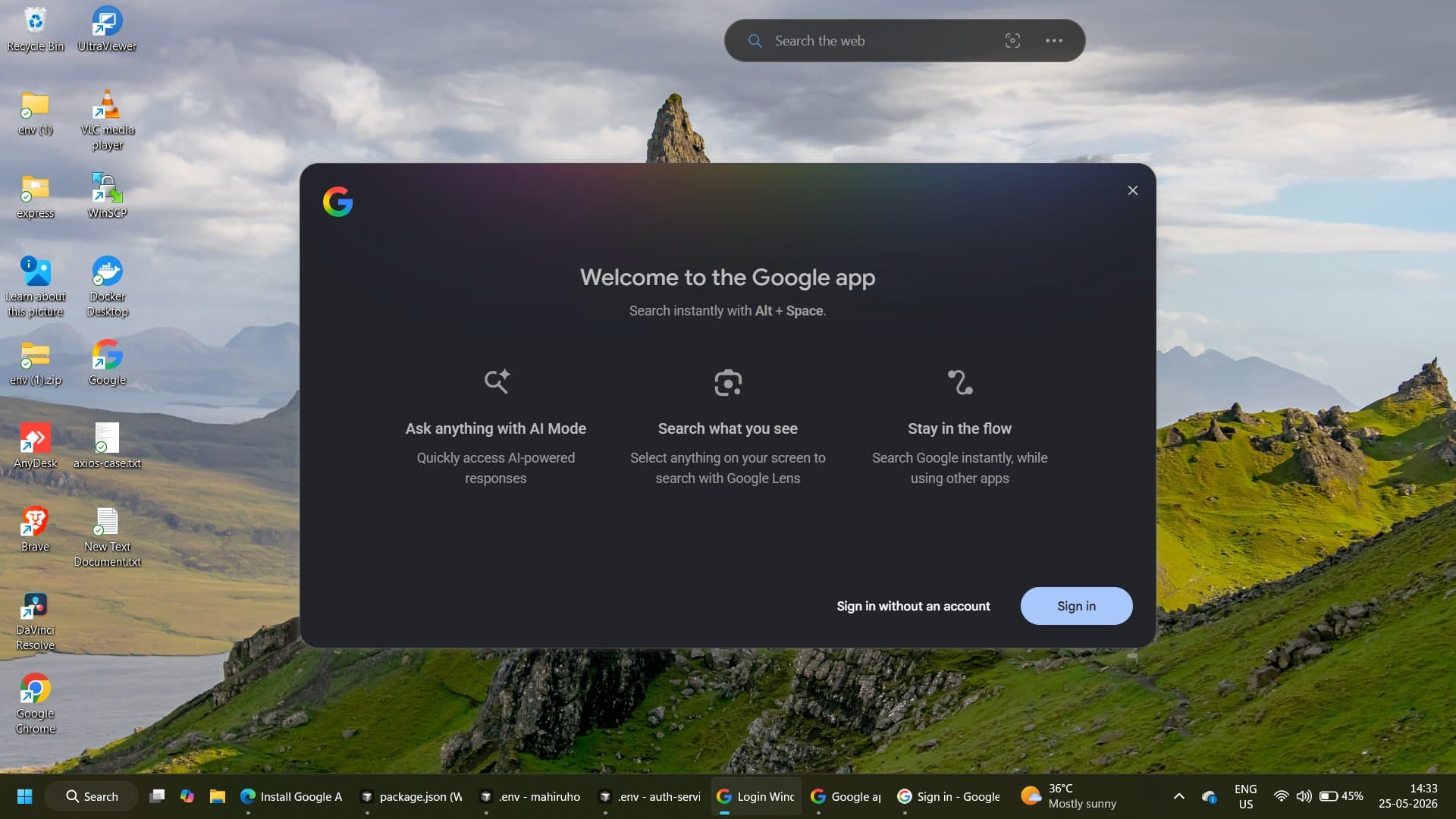
The upgraded Google app for desktop is now available for Windows users globally in English, bringing the best of Google Search right to your desktop. This isn't a browser extension or a pinned tab shortcut. It's a standalone native app, and it changes how you interact with search on Windows at the OS level.
The app gives users quick access to Google's search and AI features without relying on a browser. It first launched in September 2025 as an experimental beta version available exclusively in the US, and the full version has been available worldwide since April 14.
Windows search has always been a weak link in the desktop experience. Google is betting that a significant number of users are willing to install a separate app to fix it.
What the Google Desktop App Actually Does
The app functions as a kind of control center, allowing users to search both the web and their own PC, as well as ask Gemini questions directly, all from a single search bar.
At its core, the app turns the simple shortcut Alt + Space into an AI-powered search tool. Pressing the keys brings up a compact search box that floats above whatever you're doing. From there, you can search the web with AI-powered results, browse your local files and installed apps, and even pull in documents from Google Drive.
The app is not a replacement for Chrome or any browser. It is not meant to replace a traditional browser. Its purpose is to bring Google Search, AI Mode, Google Lens, screen sharing, computer file search, and Google Drive search into one desktop search box.
Key Technical Highlights
Here's a breakdown of the core capabilities as documented on Google's official desktop app page:
- Alt + Space shortcut: With a simple keyboard shortcut, you can instantly find what you need on your desktop, including information from the web, your computer files, installed apps, and Google Drive files.
- AI Mode: Get comprehensive AI-powered responses to your toughest questions with AI Mode. AI Mode uses a "query fan-out" technique, dividing your question into subtopics and searching for each one simultaneously across multiple data sources, then bringing those results together to provide an easy-to-understand response.
- Screen sharing: Whether you're working on a document or browsing the web, you can select a specific window or your entire screen to keep asking questions without breaking your flow.
- Google Lens integration: Thanks to Google Lens, you can select anything on the screen and search for it instantly, without needing to open a new browser tab or pick up your phone.
- Local file indexing: The Google app builds an index on your device and uses that local index to search for local files and apps. The app does not send the index of local files to Google servers.
- Custom keyboard shortcut: You can create your own keyboard shortcut to instantly open the Google app without having to search for it.
How AI Mode Works Inside the App
With AI Mode, you can ask anything and get a comprehensive AI-powered response with links to explore further. You can ask questions that might have previously taken multiple searches, like exploring a new concept or comparing options, and you can ask follow-up questions.
There is an integrated AI mode, and entering a question into the search bar brings up a response from Gemini. The conversation stays in context, so follow-up questions don't require you to restate your original query.
AI Mode in Google Search is not yet supported for all accounts, countries, and languages, so your mileage may vary depending on your region and account type. Google hasn't published a hard timeline for broader AI Mode rollout.
Privacy and Data Handling
This is the part that matters to anyone who cares about what runs on their machine.
The Google app builds an index on your device and uses that local index to search for local files and apps. The app does not send the index of local files to Google servers. When you perform a Lens query, only the part of the screen you select is sent to Google for processing a response.
Users must be at least 13 years old, and while you can use the app without signing in, logging into a Google account unlocks deeper integration with Drive and personalized results. That tradeoff is worth understanding before you authenticate. Signed-in usage means your search activity flows into My Google Activity, which you can manage or delete at any time.
What This Means for Microsoft and the Windows Search War
Google's timing here isn't accidental. Microsoft has been heavily promoting its AI assistant, Copilot, which can answer questions and assist with tasks. They've also integrated Bing search more deeply into Windows. Google's app serves as a direct counter, placing Google Search on Windows desktops before Microsoft can make Bing a regular part of daily tasks.
Windows Search has a well-documented reputation for being unreliable. Initial feedback from tech communities has varied. Some Windows users are thrilled to have a faster, more reliable search option, while others are hesitant about adding yet another Google app that runs in the background on their PC.
Google hasn't announced a version for Mac, where Apple's Spotlight is already well-established. It'll be interesting to see if Google targets that platform next.
System Requirements and Availability
Getting started is straightforward. The Google app for desktop is available globally, in English for Windows 10+. You can download it directly from search.google/google-app/desktop.
Anyone who wants to try the app can download it for free. The only requirements are a PC running Windows 10 or Windows 11 and a minimum age of 13. While the app itself is currently available only in English, users can still ask questions in other languages.
Once installed, it can be downloaded directly from Google's website. Once installed, it runs quietly in the background and is triggered with the Alt + Space shortcut at any time.
Final Thoughts
The most technically interesting part of this app isn't the Spotlight-style launcher, which is a solved problem on macOS and serviceable on Linux. It's the local file indexing that stays on-device combined with cloud-level AI Mode responses. Google is threading a real privacy needle there, and the fact that the local index never leaves your machine is a meaningful architectural choice, not just a marketing line.
What I'd watch next is whether Google expands AI Mode availability more aggressively, and whether screen sharing context gets deeper Gemini integration. Right now, you can share a window and ask questions about it, but the depth of that contextual reasoning will determine whether this app becomes a daily driver or a novelty. The competitive pressure from Copilot on Windows gives Google a real incentive to ship fast here.
If you're on Windows and frustrated with the built-in search, this is worth 10 minutes of your time to install and test. What do you think? Drop your thoughts in the comments.
Frequently Asked Questions
5 questions
1What is the Google app for desktop?
The Google app for desktop brings the best of Google Search right to your Windows desktop, letting you ask questions about what's on your screen, find information from the web, Google Drive files, installed apps, and files saved on your computer.
2How do I open the Google desktop app quickly?
On your keyboard, press Alt + Space from anywhere on your PC to instantly bring up the search bar. You can also customize this shortcut in the app's settings.
3Does the app send my local files to Google?
No. The Google app builds an index on your device and uses that local index to search for local files and apps. It does not send the index of local files to Google servers.
4Is the Google desktop app available on Mac?
Google hasn't announced a version for Mac, where Apple's Spotlight is already well-established. Currently, it's Windows-only.
5Is the app free to use?
Anyone who wants to try the app can download it for free. The only requirements are a PC running Windows 10 or Windows 11 and a minimum age of 13.